'%3e%3cpath%20d='M8.85591%2016.2988H5.69922V26.321H8.85591V16.2988Z'%20fill='%23CD2529'/%3e%3cpath%20d='M2.28671%2014.7583H5.69928H8.85597H12.247C13.0146%2014.7583%2013.7041%2014.2923%2013.9923%2013.584L14.5337%2012.2534H0L0.541378%2013.584C0.829574%2014.295%201.52178%2014.7583%202.28671%2014.7583Z'%20fill='%23CD2529'/%3e%3cpath%20d='M40.4819%2020.7617L34.6318%2012.2505H36.8135C37.433%2012.2505%2038.0148%2012.5548%2038.3676%2013.0666L42.3269%2018.8197L41.8933%2018.7174L45.7826%2013.0666C46.1354%2012.5548%2046.7145%2012.2505%2047.3367%2012.2505H49.5184L43.6656%2020.7617V26.3209H40.49V20.7617H40.4819Z'%20fill='%23CD2529'/%3e%3cpath%20d='M111.241%2012.2505V24.4355C111.241%2025.4779%20110.398%2026.3209%20109.356%2026.3209H108.157V14.1359C108.157%2013.0935%20109%2012.2505%20110.043%2012.2505H111.241Z'%20fill='%23CD2529'/%3e%3cpath%20d='M136.777%2025.6828C135.641%2025.0903%20134.768%2024.2472%20134.154%2023.151C133.54%2022.0548%20133.235%2020.7673%20133.235%2019.2886C133.235%2017.8099%20133.542%2016.5198%20134.154%2015.4236C134.768%2014.3274%20135.641%2013.4843%20136.777%2012.8918C137.914%2012.2992%20139.247%2012.0029%20140.78%2012.0029C142.312%2012.0029%20143.645%2012.2992%20144.782%2012.8918C145.919%2013.4843%20146.791%2014.3274%20147.405%2015.4236C148.02%2016.5198%20148.324%2017.8073%20148.324%2019.2886C148.324%2020.77%20148.017%2022.0413%20147.405%2023.1429C146.791%2024.2445%20145.919%2025.0903%20144.782%2025.6828C143.645%2026.2754%20142.312%2026.5716%20140.78%2026.5716C139.247%2026.5716%20137.914%2026.2754%20136.777%2025.6828ZM143.185%2023.4634C143.877%2023.0729%20144.405%2022.518%20144.774%2021.8016C145.143%2021.0851%20145.326%2020.2475%20145.326%2019.2886C145.326%2018.3298%20145.143%2017.4733%20144.774%2016.7568C144.408%2016.0404%20143.88%2015.4855%20143.196%2015.095C142.511%2014.7044%20141.706%2014.5105%20140.78%2014.5105C139.853%2014.5105%20139.048%2014.7044%20138.364%2015.095C137.679%2015.4855%20137.154%2016.0404%20136.785%2016.7568C136.416%2017.4733%20136.233%2018.3163%20136.233%2019.2886C136.233%2020.261%20136.416%2021.0851%20136.785%2021.8016C137.152%2022.518%20137.682%2023.0729%20138.374%2023.4634C139.067%2023.854%20139.867%2024.0479%20140.78%2024.0479C141.693%2024.0479%20142.493%2023.854%20143.185%2023.4634Z'%20fill='%23CD2529'/%3e%3cpath%20d='M78.4727%2012.2505H75.2326L69.1724%2026.3209H71.249C72.0139%2026.3209%2072.7061%2025.8577%2072.9943%2025.1493L73.937%2022.841L74.9605%2020.3173L76.8405%2015.6684L78.7205%2020.3173L79.744%2022.841L80.6867%2025.1493C80.9776%2025.8577%2081.6671%2026.3209%2082.4321%2026.3209H84.5087L78.4727%2012.2505Z'%20fill='%23CD2529'/%3e%3c/g%3e%3c/svg%3e)
Messaging channels
T-Agent can connect to Telegram, Feishu or Lark, DingTalk, WeChat, and WeCom. Slack and Discord are currently marked as coming soon.
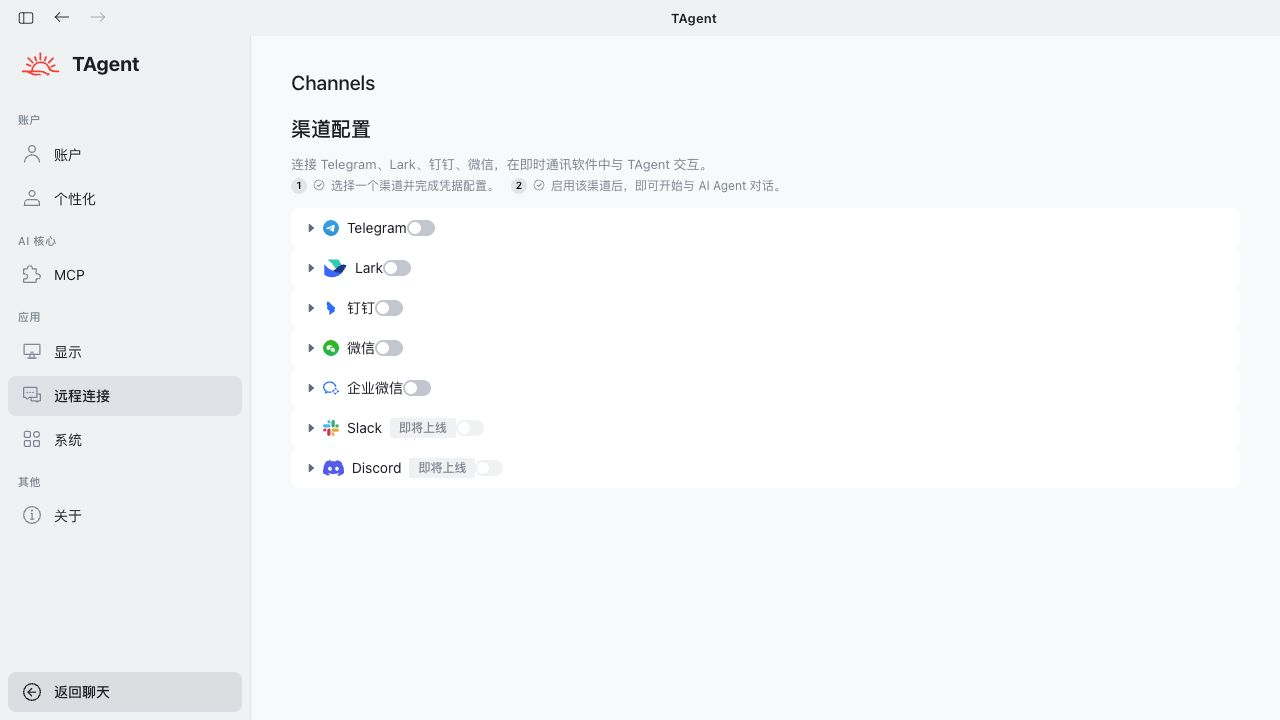
General setup
- Open Settings > Channel configuration, select a channel, and read its field descriptions.
- Create or select a bot or app in the channel's official administration console. Enter credentials only in the controlled configuration page, never in a chat, screenshot, document, or task instruction.
- Select the agent, permitted users, primary chat, or allowed groups, then save and enable the channel.
- Send a test message without sensitive information. Check access boundaries, group trigger rules, and notifications.
- Disable the channel and revoke old credentials when staff change, a device is lost, a bot is replaced, or credentials may have leaked. Check scheduled-task dependencies first.
Telegram
Create a bot with BotFather and enter its Bot Token. The token controls the bot. Regenerate it immediately if exposed. A user usually needs to message the bot before a private conversation can begin. For group use, review privacy mode and mention requirements.
Official references: BotFather and Telegram bots, group privacy mode.
Feishu and Lark
Bind an existing bot by QR code or enter its App ID and App Secret. Confirm that the app belongs to the correct tenant and configure its availability, event subscription, and message permissions in the official console.
Test direct messages, group messages, notifications, and revoked access in a test group before production use.
Official references: Feishu custom app guide, Lark custom app guide.
DingTalk
Enter the Client ID or AppKey and Client Secret or AppSecret required by the selected DingTalk connection method. Enable the bot and the corresponding event or Stream configuration in the DingTalk developer console. Limit application visibility to the people who need it.
Official reference: DingTalk custom bot access.
WeChat usually connects through a QR code or a login flow shown in the channel page. Use an authorized business account instead of a personal primary account. Login expiration, mobile confirmation, risk controls, and account changes can interrupt messages.
WeCom
An administrator normally creates an application and supplies the Corp ID, Agent ID, and Secret. A callback setup also requires a matching Token, EncodingAESKey, and callback URL. Keep every value within the same company and application, and limit visibility to the required departments.
Official references: create an app and obtain credentials, receive messages and events.
Tyaio · Updated