'%3e%3cpath%20d='M8.85591%2016.2988H5.69922V26.321H8.85591V16.2988Z'%20fill='%23CD2529'/%3e%3cpath%20d='M2.28671%2014.7583H5.69928H8.85597H12.247C13.0146%2014.7583%2013.7041%2014.2923%2013.9923%2013.584L14.5337%2012.2534H0L0.541378%2013.584C0.829574%2014.295%201.52178%2014.7583%202.28671%2014.7583Z'%20fill='%23CD2529'/%3e%3cpath%20d='M40.4819%2020.7617L34.6318%2012.2505H36.8135C37.433%2012.2505%2038.0148%2012.5548%2038.3676%2013.0666L42.3269%2018.8197L41.8933%2018.7174L45.7826%2013.0666C46.1354%2012.5548%2046.7145%2012.2505%2047.3367%2012.2505H49.5184L43.6656%2020.7617V26.3209H40.49V20.7617H40.4819Z'%20fill='%23CD2529'/%3e%3cpath%20d='M111.241%2012.2505V24.4355C111.241%2025.4779%20110.398%2026.3209%20109.356%2026.3209H108.157V14.1359C108.157%2013.0935%20109%2012.2505%20110.043%2012.2505H111.241Z'%20fill='%23CD2529'/%3e%3cpath%20d='M136.777%2025.6828C135.641%2025.0903%20134.768%2024.2472%20134.154%2023.151C133.54%2022.0548%20133.235%2020.7673%20133.235%2019.2886C133.235%2017.8099%20133.542%2016.5198%20134.154%2015.4236C134.768%2014.3274%20135.641%2013.4843%20136.777%2012.8918C137.914%2012.2992%20139.247%2012.0029%20140.78%2012.0029C142.312%2012.0029%20143.645%2012.2992%20144.782%2012.8918C145.919%2013.4843%20146.791%2014.3274%20147.405%2015.4236C148.02%2016.5198%20148.324%2017.8073%20148.324%2019.2886C148.324%2020.77%20148.017%2022.0413%20147.405%2023.1429C146.791%2024.2445%20145.919%2025.0903%20144.782%2025.6828C143.645%2026.2754%20142.312%2026.5716%20140.78%2026.5716C139.247%2026.5716%20137.914%2026.2754%20136.777%2025.6828ZM143.185%2023.4634C143.877%2023.0729%20144.405%2022.518%20144.774%2021.8016C145.143%2021.0851%20145.326%2020.2475%20145.326%2019.2886C145.326%2018.3298%20145.143%2017.4733%20144.774%2016.7568C144.408%2016.0404%20143.88%2015.4855%20143.196%2015.095C142.511%2014.7044%20141.706%2014.5105%20140.78%2014.5105C139.853%2014.5105%20139.048%2014.7044%20138.364%2015.095C137.679%2015.4855%20137.154%2016.0404%20136.785%2016.7568C136.416%2017.4733%20136.233%2018.3163%20136.233%2019.2886C136.233%2020.261%20136.416%2021.0851%20136.785%2021.8016C137.152%2022.518%20137.682%2023.0729%20138.374%2023.4634C139.067%2023.854%20139.867%2024.0479%20140.78%2024.0479C141.693%2024.0479%20142.493%2023.854%20143.185%2023.4634Z'%20fill='%23CD2529'/%3e%3cpath%20d='M78.4727%2012.2505H75.2326L69.1724%2026.3209H71.249C72.0139%2026.3209%2072.7061%2025.8577%2072.9943%2025.1493L73.937%2022.841L74.9605%2020.3173L76.8405%2015.6684L78.7205%2020.3173L79.744%2022.841L80.6867%2025.1493C80.9776%2025.8577%2081.6671%2026.3209%2082.4321%2026.3209H84.5087L78.4727%2012.2505Z'%20fill='%23CD2529'/%3e%3c/g%3e%3c/svg%3e)
What is T-Agent?
T-Agent is a ready-to-use AI task execution workspace. It helps individual founders, small teams, and business operators hand off repetitive work that can be reviewed against a clear result. Within one project, you can keep a conversation going, add files, and ask follow-up questions. Plugins, skills, scheduled tasks, and messaging channels extend what T-Agent can do.
T-Agent is built for real operational work. It can organize tasks that span files and platforms, including market research, product and supplier information, campaign planning, content production, social media operations, reporting, and customer service preparation.
Its purpose is simple: reduce repetitive work so people can spend more time on judgment, decisions, customer relationships, and creative work.
Why teams use T-Agent
Work that once required several people to search, organize, rewrite, and follow up can be coordinated by one operator through T-Agent. It does not replace the business owner. It takes on clearly defined work units and prepares structured material for decisions that still require human judgment.
Simple to start
- Describe the goal, output format, and constraints in natural language.
- Add context and request revisions in the same conversation.
- Keep files and conversation history inside a project so you do not repeat the same background.
Designed for operational work
- Supports travel market research, product sourcing, campaigns, social content, video scripts, GEO, and related work.
- Turns one-off tasks into repeatable workflows with plugins, skills, scheduled tasks, and messaging channels.
- Uses drafts and previews where available so you can review the result before an external action.
Controlled execution
- Projects, workspaces, and task context are managed in the local environment. Back up important work according to your organization's policy.
- Channel credentials, user pairing, plugins, and workspace access should be configured by an authorized owner with the minimum required scope.
- Payments, publishing, refunds, customer commitments, and other irreversible actions should retain a human review step.
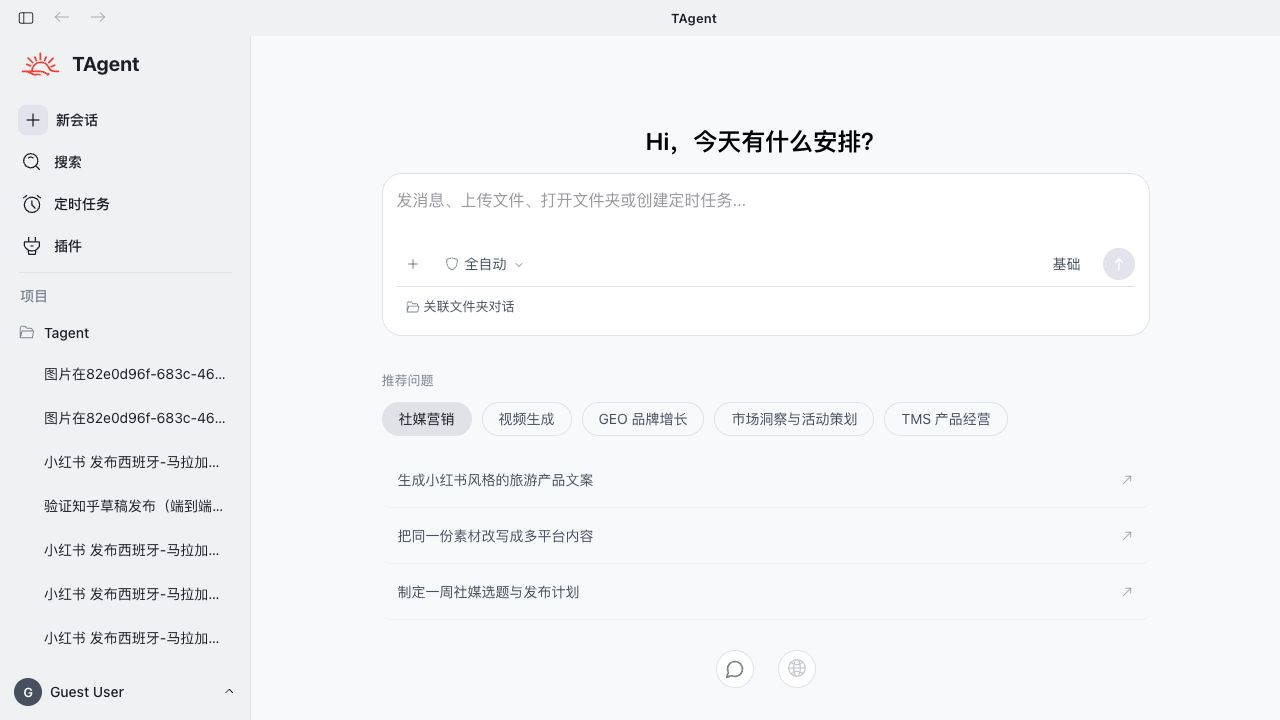
On the home screen, you can send a message, upload a file, open a folder, or ask T-Agent to create a scheduled task. The sidebar lets you start a conversation, search history, manage scheduled tasks and plugins, and organize conversations by project.
Tyaio · Updated